Loading…

Unreal Engine 5 · Blueprints
Blueprint AI that edits the real graph
What Dola’s Blueprint AI tools do in Unreal Engine 5: read graphs, add and wire nodes, set variables and components, compile, save. Real tools, real limits.
Last updated 31 October 2026
What “Blueprint AI” means in Dola
Dola’s Blueprint tools change Blueprint assets inside the running Unreal Editor. You describe the behavior in chat. A Blueprint specialist reads the graph, places and wires nodes, sets variables and components, lays the graph out, compiles, saves, and tells you what it changed.
That goes through the Dola Editor plugin and a local bridge to the desktop app. It is not a text-to-image node diagram and it does not guess at .uasset file contents.
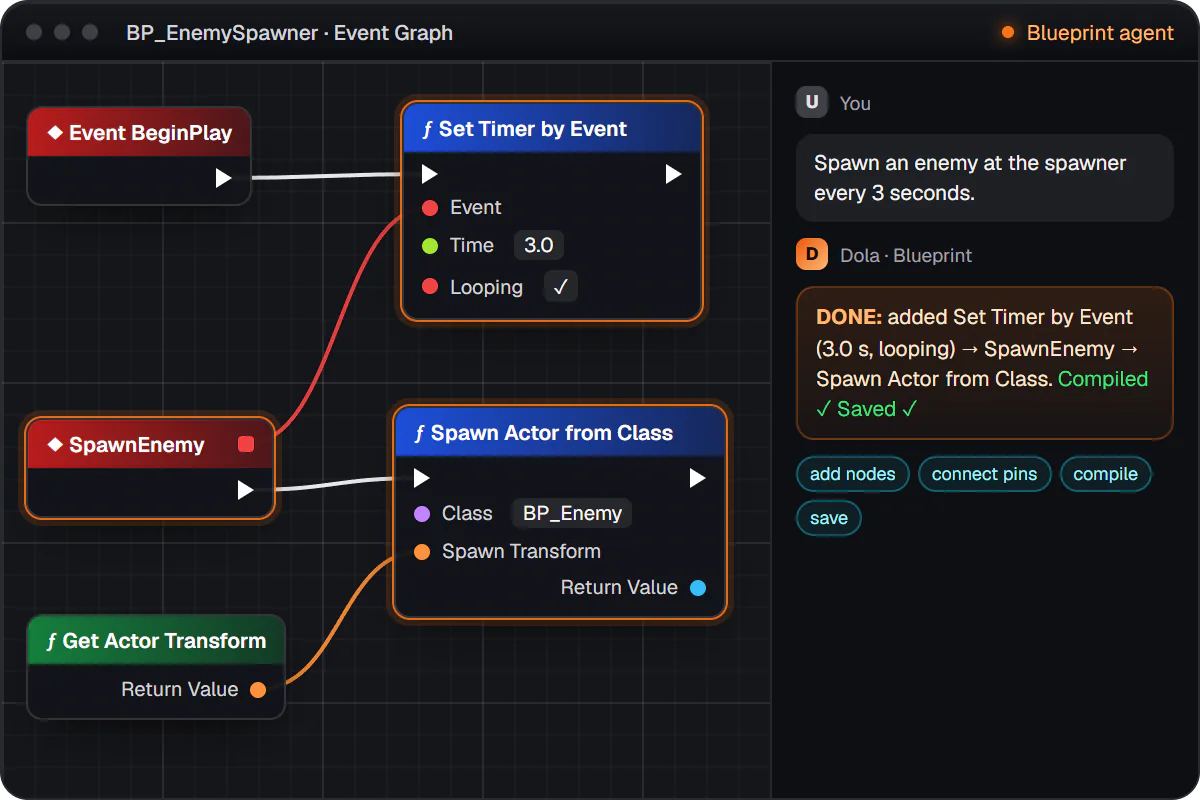
Illustration of the flow, not a screenshot.
The Blueprint tools, one by one
- Inspect graphs: Reads nodes, pins, and connections so Dola understands the current logic first. Read-only.
- Find nodes: Searches the nodes you can place, including engine and project functions, instead of guessing.
- Add and wire nodes: Places nodes and connects pins: events, branches, timers, function calls.
- Update node properties: Changes default pin values, referenced assets, and node settings without a rebuild.
- Remove nodes and links: Deletes nodes or disconnects pins, for example debug prints or an unused Tick.
- Variables and defaults: Adds variables or changes defaults, categories, and instance-editable or expose-on-spawn flags.
- Components: Adds meshes, collision, lights, audio, and movement components and sets their properties, physics included.
- Compile: Compiles after edits and explains errors and warnings in plain language so they get fixed in the same chat.
- Save: Saves changed Blueprint assets to disk so they show up in source control.
- Auto-layout: Tidies node positions so new and existing logic stays readable.
Example prompts and requirements for each are in Blueprint editing tools. Node lookups use the Engine API reference so the graph only uses nodes your engine has.
Prompts that work
- “When the player presses E near BP_Door, open the door over one second.”
- “Add a float MaxHealth = 100 to BP_Enemy and make it editable per instance.”
- “Change the delay in BP_Spawner from 2 to 0.5 seconds.”
- “Add a static mesh and a box collision to BP_Pickup.”
- “Remove the debug print nodes from BP_PlayerCharacter.”
- “What happens in BP_Door when the player overlaps the trigger?”
Name the Blueprint, ask for one change you can check, and say how you will test it. The walkthrough is your first Blueprint with Dola.
Limits
- Unreal Editor must be open on the project with the plugin enabled. Published plugin builds are UE 5.7, Windows and Linux editors only.
- Removing nodes is destructive; take a checkpoint first. Replacing a graph’s nodes asks for approval in chat.
- The first-Blueprint guide has not yet been re-checked click by click against a running game project; it describes the shipped flow.
- If you want the logic in C++ instead, Dola edits Source/ files and you build as usual. See first C++ assistance.
FAQ
Dola does it by editing real Blueprint assets in the open Unreal Editor through its plugin: it adds and wires nodes, sets variables and components, then compiles and saves. It does not write .uasset bytes or hand you a picture of a graph to rebuild by hand.
Yes, and that is the best way to start. Name an existing Blueprint and a small change you can check, for example opening BP_Door over one second when the player presses E nearby. Dola reads the graph first, then edits it.
Dola compiles after its own edits and reports the errors in chat, then fixes them in the same conversation. You can also ask it to compile and explain a Blueprint you changed yourself.
Create a checkpoint before large edits. Checkpoints show what changed since, including Blueprint diffs, and roll back what Dola wrote. Removing nodes and replacing a graph’s nodes are treated as risky.
The Dola desktop app, signed in, with your project attached, and Unreal Editor open on that project with the Dola plugin enabled. Published plugin builds are for Unreal Engine 5.7 on Windows and Linux.
Try it
Free with your own model API key once you have access. Everything else Dola does in Unreal is on the Unreal Engine AI assistant page.