Loading…

Unreal Engine 5 · AI assistant
An AI assistant that works inside Unreal Engine 5
Dola AI for Unreal Engine 5: a desktop app and UE 5.7 Editor plugin that edits Blueprints, drives the editor, and writes C++. With real limits and pricing.
Last updated 31 October 2026
The short answer
Dola AI (dolaai.pro) is an AI assistant for Unreal Engine 5. It is two pieces: the Dola desktop app for Windows, macOS, and Linux, and an Unreal Editor plugin that connects the open editor to that app over a local bridge. You describe a task in chat; specialist agents read your project, act in the running editor, and report what changed.
It is built for the Unreal loop: Blueprint graphs, levels, assets, materials, Play in Editor, and C++ source in the same project. If most of your day is generic code outside Unreal, a general AI IDE is the better primary tool, and many people use both.
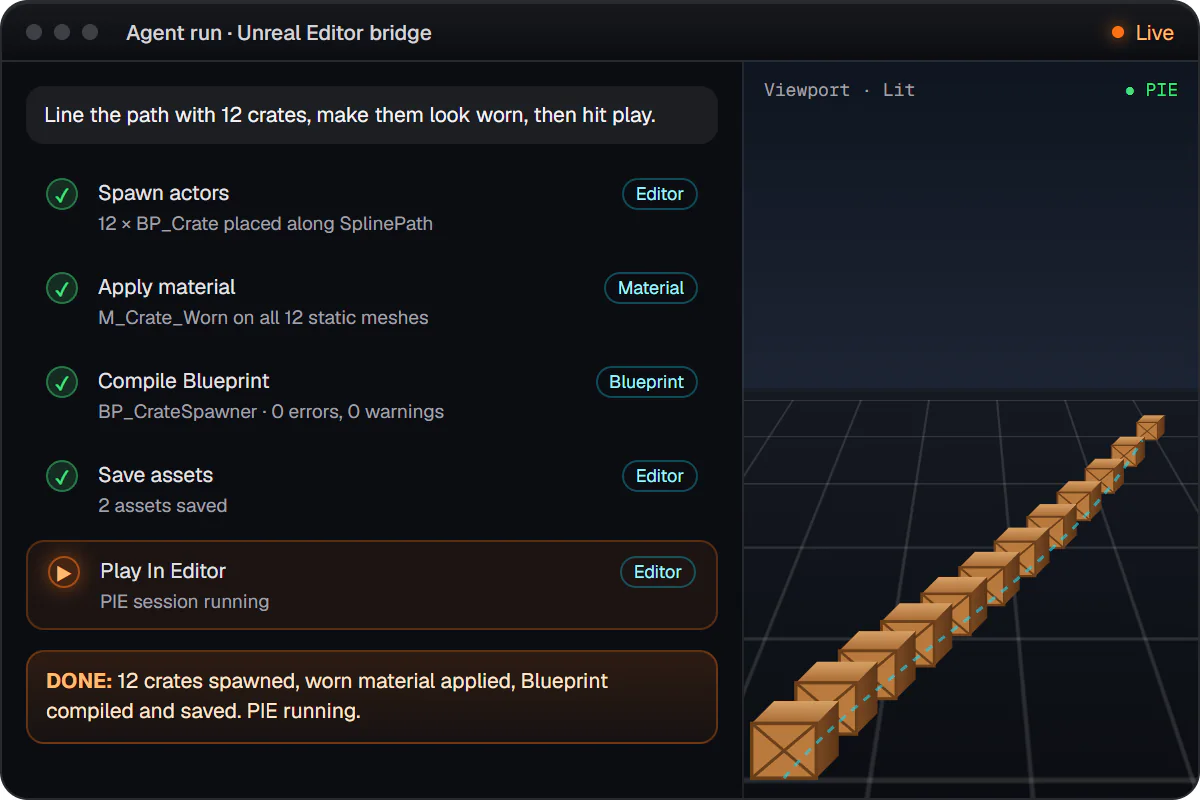
What it can do in a UE5 project
- Blueprints: read graphs, find the right node, add and wire nodes, set variables and components, compile, save, and tidy the layout (Blueprint AI in detail).
- Editor actions in plain language: levels, assets and imports, materials, animation, Niagara, UI widgets, audio, Sequencer, gameplay AI assets, and project settings such as gameplay tags and default maps (editor actions).
- Engine API lookup: checks that classes, functions, and Blueprint nodes really exist in your engine before using them (Engine API reference).
- C++ source: new actor and component classes, UPROPERTY / UFUNCTION exposure, and fixes for build errors you paste in (C++ tools).
- Playtesting: Play in Editor runs with pass/fail checks, Unreal automation tests, and performance traces (playtesting and QA).
- Project knowledge: a local index of assets, Blueprints, levels, and dependencies, so answers fit your project (project knowledge).
- Safety rails: named checkpoints with rollback, and approval prompts in chat before risky actions such as plugin or config changes, new C++ classes, packaging, and force deletes (plans, checkpoints, and approvals).
Every tool, with example prompts and requirements, is in the tools reference.
Real limitations
- The plugin is published for Unreal Engine 5.7 only, for Windows and Linux editors. No macOS editor support yet, and no self-built (source) engines.
- Access is through a waitlist; there is no public direct download link.
- Dola does not compile your C++ for you after each edit. You build in Unreal or your IDE as usual, and can paste errors back for a fix.
- Running Python scripts inside the editor is planned, not available yet.
- It is an editor teammate, not a runtime feature: it does not ship gameplay NPC AI inside your game (see NPC AI vs developer assistants).
- Modeling mode is a separate Babylon.js studio in the app that exports GLB, not the Unreal viewport.
How it compares
| Kind of tool | Works in the live editor | Best at |
|---|---|---|
| Dola AI (app + UE plugin) | Yes, through its own plugin | Blueprints, editor work, and UE C++ in one chat |
| AI IDEs (Cursor, Copilot) | Not by default; possible with an MCP bridge | Source code across many languages |
| Terminal agents (Claude Code) | Not by default; possible with an MCP bridge | Repo-wide edits and shell builds |
| MCP servers for Unreal | Yes, as a bridge for another AI client | Exposing editor actions to the client you pick |
Longer, honest write-ups: Dola AI vs Cursor, Claude Code for Unreal Engine, and Unreal Engine MCP and Dola.
Pricing
Free to download and free to use with your own model provider API key (Anthropic, OpenAI, Google, Groq, xAI, Mistral, Cerebras, or a custom or local endpoint), set under Settings → Model → Override provider. You pay the provider directly and use no Dola credits.
Monthly plans add Dola-hosted models, no key needed:
- Indie: $10 per month, includes $10 of AI credits each paid month.
- Pro: $50 per month, includes $50 of AI credits each paid month.
- Pro+: $100 per month, includes $100 of AI credits each paid month.
- Max: $200 per month, includes $200 of AI credits each paid month.
Unused included credits reset on renewal. Current prices are on plans.
Get started
- Join the waitlist (free).
- When you have access, download the desktop app from the signed-in Releases page (download guide).
- Sign in from the app and attach your .uproject.
- Click Install Dola plugin, then open Unreal Editor so the bridge connects (connect a project).
FAQ
It depends on where the work happens. For general C++ and multi-language repos, an AI IDE such as Cursor or a terminal agent such as Claude Code is strong. For work inside Unreal Editor (Blueprint graphs, levels, materials, Play in Editor) you need a tool that talks to the running editor. Dola AI is built for that second case: a desktop app plus an Unreal Editor plugin with a local bridge.
Published Dola plugin builds are for Unreal Engine 5.7, on Windows and Linux editors, in Epic’s own engine builds. macOS editors and self-built (source) engines are not supported yet. The desktop app itself runs on Windows, macOS, and Linux.
Both. With the plugin connected, Dola reads and edits Blueprint graphs in the open editor (nodes, pins, variables, components), then compiles and saves. For C++ it edits headers and .cpp files under Source; you build in Unreal as usual.
Downloading and using Dola is free with your own model provider API key; you pay that provider directly. Monthly plans (Indie $10, Pro $50, Pro+ $100, Max $200) add Dola-hosted models with the same amount in included AI credits each paid month.
Access opens in waves from a waitlist. After you are let in, installers for Windows, macOS, and Linux are on the signed-in Releases page, and the app installs the Unreal plugin into your project.