
Build with Dola
Modeling mode
In-app Babylon studio: chat writes mesh code, a live viewport updates, you inspect parts, then export GLB. Not the Unreal viewport.
Last updated 10 October 2026
What you are looking at
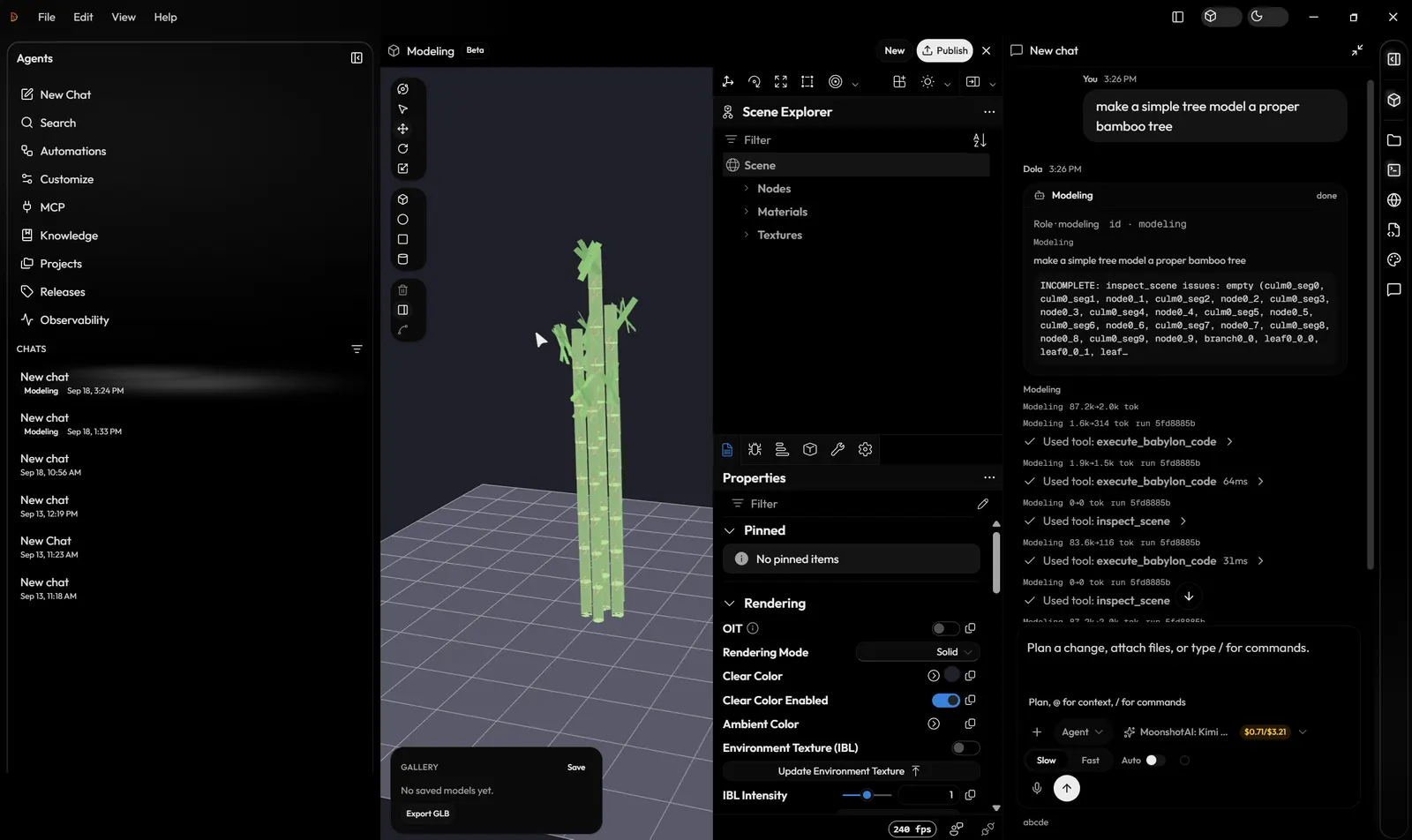
Modeling mode is a Babylon.js studio inside the desktop app. You describe an object in chat and Dola builds it as named parts. The live viewport, Scene Explorer, and Properties pane update on your machine. When the result checks out, the scene exports to GLB. See the modeling tools for example prompts.
The loop
- Switch to Modeling in the title bar (Ctrl+Shift+M).
- Ask for a specific object. Dola builds it from named parts with real proportions.
- Dola checks the live scene before it calls the model done, and tells you if something is still incomplete.
- Add colour and PBR materials in the studio, for the whole model or named parts.
- Export GLB, or use Send to Unreal to import the model into your open project as a static or skeletal mesh.
What this is not
It is not the Unreal viewport and not a hosted text-to-3D farm. Nothing reaches your Unreal project until you send it. Game-dev Blueprints and C++ stay on the Unreal plugin path. See Game-dev vs Modeling · Agent roster · Blog note.